
 ">
Garmin inReach Mini 3 Plus Review
Quick Verdict
The Garmin inReach Mini 3 Plus is the most capable satellite communicator Garmin has made for hikers, with an improved display and new photo and audio messaging capabilities. It’s a compelling upgrade, though the added weight and cost are real tradeoffs.
Best for
- Thru-hikers and backpackers far from cell service
- Backcountry travelers who want reliable SOS backup
- People who value two-way messaging and live tracking
Not ideal for
- Ultralighters obsessed with saving every ounce
- Anyone who plans to rely on their GPS device as a standalone navigation/weather forecasting tool
- Hikers satisfied with phone-based satellite features alone
Standout feature
Upgraded communication. Photo messaging, voice notes, longer texts, and reliable two-way satellite messaging make emergencies and coordination far easier.
Biggest drawback
Subscription headaches. Garmin’s newer plans are less user-friendly, and activation fees plus message upcharges make ownership more expensive than the sticker price suggests.
Bottom line
If reliable messaging matters most, the Mini 3 Plus still earns its place in a thru-hiker’s kit.
The technology of thru-hiking is changing fast. Twenty years ago, any electronics would have been out of place in a packing list. Now, most hikers would be literally lost without trail tech. It’s common for a cell phone to be your lifeline for navigation, entertainment, and calling shuttles.
In the eight years since the original inReach Mini 1 was released, satellite communication devices have also become standard kit for many hikers. I’ve been rocking one for nearly six years myself, starting with the original Mini 1, then the minorly updated Mini 2.
The Garmin inReach Mini 3 and, especially, the Mini 3 Plus, represent a much more substantial and modern update to backcountry devices. Are the new features a hail mary to stay relevant during the rise of direct-to-satellite cell phone service, or a compelling new necessity?
Garmin inReach Mini 3 Plus At-A-Glance
Price: $500 ($450 for the standard Mini 3 model)
Weight:
- Device Only: 4.4oz
- Grosgrain keeper ribbon and carabiner: 0.5oz
Dimensions:
- 2.16” x 3.85” x 1.05”
- Screen size: 1.52” x 1.14”
- Screen resolution: 306 x 230 pixels
Battery life (per manufacturer):
- 350 hours (14.5 days) of 10-minute interval inReach tracking
- 95 hours (4 days) in “performance messaging mode”

Backcountry ski trip, inReach Mini 3 plus stowed away in my fanny pack. Don’t worry about why I have a full-sized sled strapped to my pack.

Intended Use
The Garmin inReach Mini 3 Plus is a versatile satellite communicator, useful for adventurers who travel far from cell phone service. Its compact format is best for human-powered athletes, such as thru-hikers, bikers, and skiers.
Circumstance of Review
I upgraded to the Mini 3 Plus as a lackluster winter turned into a brutally hot spring. For me, that meant backcountry skiing, running, hiking, and climbing. I always leave a PLB (personal locator beacon) in my go-to adventure bag, and it came on adventures from the Rockies all the way to the Mojave Desert.
Garmin inReach Mini 2 vs. Mini 3 vs Mini 3 Plus
The inReach Mini 3 has slightly longer battery life than the previous model and has introduced a hybrid touchscreen interface for the first time. The screen is also larger in the 3 and 3 Plus.
The device also now supports multi-band frequencies, which means it can use multiple GNSS frequency bands for more accurate positioning. The Mini 3 Plus takes this a step further with the introduction of voice and photo messaging via satellite.
The Mini 2 weighs 3.5 ounces, while the Mini 3 and 3 Plus weigh 4.3 and 4.4 ounces, respectively. Each model also gets progressively more expensive, with the 2 at $350, the 3 at $450, and the 3 Plus at $500.
Garmin inReach Mini 3 Plus Features
SOS Button
This is the feature that most people buy a personal locator beacon for. Tucked away under a protective red flap is an SOS button that quickly sends a distress signal to an emergency call center. When you’re in a sticky situation that you can no longer handle by yourself, this is one of the best ways to contact help.
Even if you are confident in your skills, it’s never bad to have another form of emergency contact when shit hits the fan.
Two-Way Satellite Communication
Most people carrying an inReach are never going to actually hit the SOS button (that’s a good thing!). If you’re not using the keynote feature, why carry it? inReach devices are also capable of two-way communication via satellite.
Since getting one, I find myself using the messaging features more often than I anticipated. Sometimes it’s for low-stakes campsite coordination, sometimes to say hi to friends, and sometimes to get detailed conditions updates on fire, weather, or trail closures from someone back home.
Backcountry Weather Forecast
Another feature I did not anticipate using frequently was the weather forecast. Planning to go over an exposed ridge and want a heads up on any potential thunderstorms? inReach devices have the ability to request a forecast for your current location (or another location if manually input).
On the Mini 3 Plus, the forecast is returned well-formatted with two days’ worth of 2-hour forecasts and a week’s worth of daily summary forecasts. This usually includes rain chances, temperature, wind speed and direction, approximate cloud coverage, and more. See more below on its dubious accuracy.
Navigation Tools
Loaded on board is also a compass and an (incredibly basic) map. The device can also follow loaded courses, which is the most realistic way to use it for navigation. Without any context on the map or anything to show scale, this is essentially breadcrumb navigation. Expect to still pull out the phone or smartwatch for real navigation.
Siren Mode
A new feature for the Mini 3 Plus is “Siren Mode.” This mode activates a series of attention-catching loud noises. The goal here is to make it easier to locate someone without needing to shout (or even be conscious). Testing it inside my house, it is loud but not unbearable, and likely capable of narrowing the search radius quite a bit.
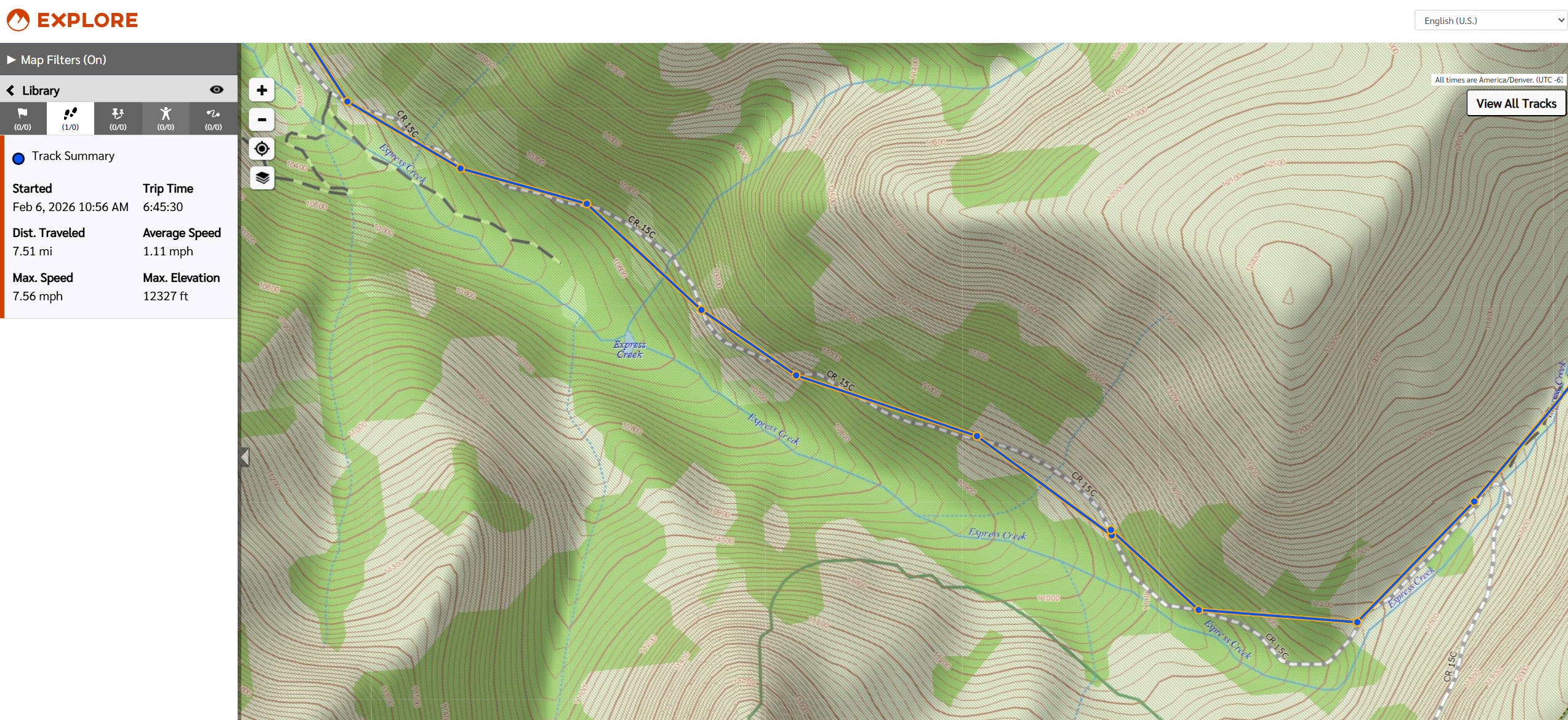
A screenshot of the live tracking feature. Folks at home can follow a link and see your progress ‘live.’ In this case, I was following a road cut with a relatively tight tracking interval, but you can see the accuracy isn’t quite as high as a smartphone or GPS watch. This saves data and is super sufficient for narrowing a search radius if needed.
Live Tracking
A long-time feature of the inReach series is the ability to constantly upload GPS coordinates via satellite. This service costs extra on most subscriptions, but the tracking interval can be manually adjusted to save money and battery. If you have an overly concerned partner or family member back home, this feature may just be what gets you out the door.
Be cautioned that, like any device, especially one using satellite technology, it may lose connection or pause without you noticing. The front country peanut gallery should be aware that a few hours of gap doesn’t mean you are dead.
Garmin inReach Mini 3 Plus Pros
Upgraded Communication (including photos and audio)
The most unique upgrade the 3 Plus brings to the table is its ability to send pictures and 30-second audio recordings over satellite without requiring cell signal.
Previously, the inReach devices were only capable of communicating in short text messages. Speaking of which, the max message length has also changed from 160 characters to 1,600 characters. This is enabled thanks to a new antenna design, the specifics of which are beyond my or most people’s technical know-how.
This comes with a few caveats. First, the audio recordings are NOT a phone call; they are recorded and then sent as a regular voice note, which can still take a few minutes.
Second, to transmit photos/audio/long-format texts, the receiver must use the proprietary Garmin Messenger App. If the recipient doesn’t have an account already, it will still deliver some text over SMS (or, in the case of voice memos, an automatic transcription) and include extra instructions on setting up an account for the extra content.
I initially dismissed these features as fun but ultimately non-essential. Garmin’s advertising for these features features imagery of epic summits, not search-and-rescue.
Over my testing period, though, I considered more how they might be helpful in an emergency. Being able to send a photo of an injury, rash, or fire might genuinely improve emergency response quality. Using voice recordings might allow thorough communication when fingers are frozen or broken (both of which are fairly likely in hiker emergencies).
I tested the photo feature a few times and found it as reliable and fast as regular messaging. I did not experience any critical need for this feature, but after a serious fall on trail last year that involved bleeding from the head and severe bruising, I can see where it would come in handy for remote assessments.
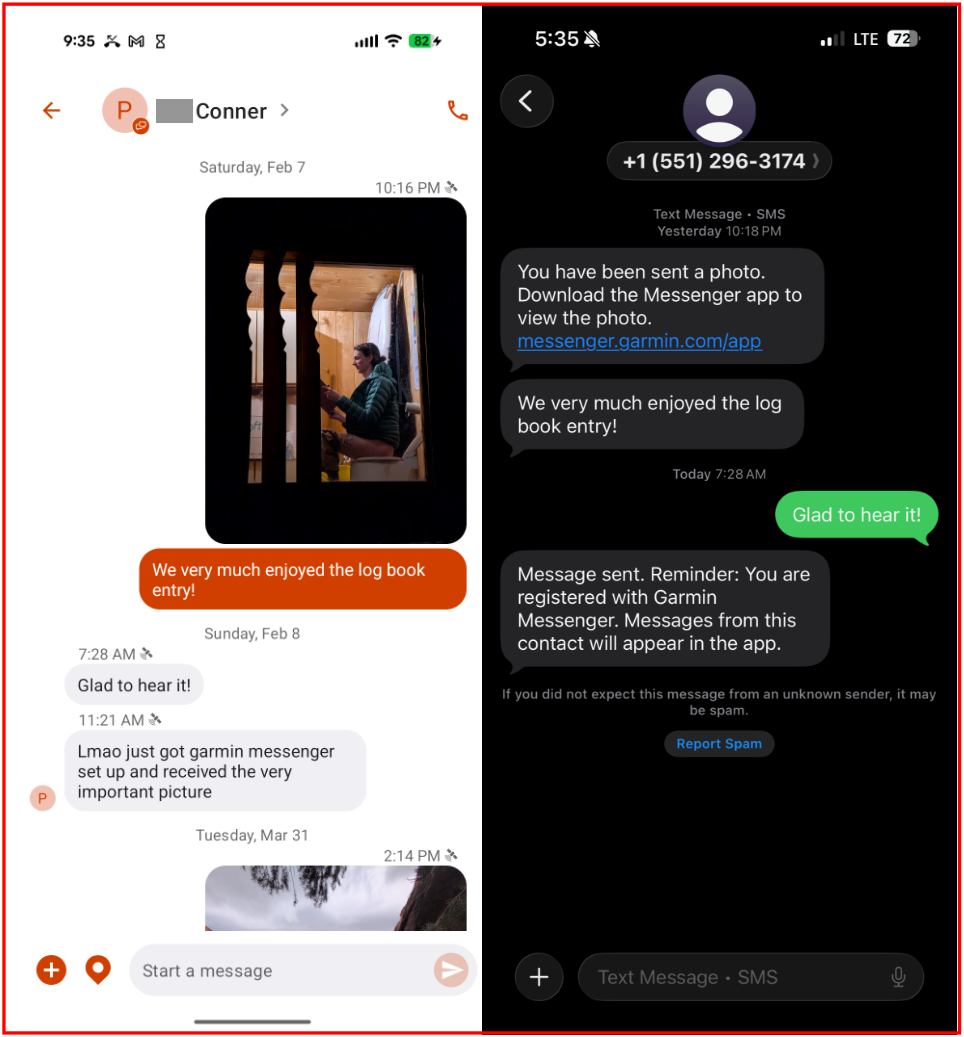
Sending a photo message (via the Garmin Messenger App) versus what someone without an account will receive. The (551) phone number is a generic, random number owned by Garmin, which can be confusing to the receiver. Once the app is downloaded, life is much easier.
Long Battery Life
Having owned all three generations of inReach devices, I have always been impressed with their battery life. Simple tasks like preset check-in messages are usually quite efficient, and short rounds of communication have minimal effect on battery life. When the device is in a more challenging situation and is struggling to connect to satellite, the battery usage does bump up a bit.
With the Mini 3 Plus, I experienced much of the same. I felt no need to charge it mid-trip, even when using LiveTrack for a long backcountry ski into a hut and sending photo messages. In most scenarios, I would not expect hikers to need charging on trail.
Officially, the inReach series uses similar battery chemistry to smartphones, and performance will degrade around the freezing point. Unofficially, I have never experienced the “sudden battery dump” that my phones and battery banks have when left out in the cold overnight.
The Mini 3 Plus came with me on many backcountry ski and hiking trips this year, and I never experienced any weather-related performance issues.
Improved Screen and Navigation
One of the most noticeable upgrades when booting up the device is that the Mini 3 Plus now features a color touchscreen. Previous generations were limited to a very low resolution, non-touch, black-and-white display. While the quality is not quite at smartphone standards, this MIP (memory in pixel) display is a much better balance of usability and power consumption than in the past.
The main reason I prefer the Mini over the Messenger device series is that the large screen and display combo make it possible to write custom messages without a smartphone connected.
The Mini 3 Plus significantly improves this experience by providing a touchscreen keyboard, in addition to the previous “ribbon” keyboard (using the exterior buttons to scroll through letters one at a time. Yes, this is slow and painful).
Frustratingly, to get back to the reliable button-based ribbon keyboard, you do need to press one button on the touchscreen. This could be a bit of a problem in rain, while wearing gloves, or if the display cracks. As an alternative, though, initiating a voice message from the device is the easiest and requires the least button-pressing or touchscreen tapping.
The color and pixel count upgrades make the navigation features slightly more usable. On this device, you can upload a track and “follow the line” to navigate. While not nearly as good as a smartphone or modern GPS watch, this serves as a power-efficient backup when things go south. The lack of context maps makes this far from a plan A, at least to me.
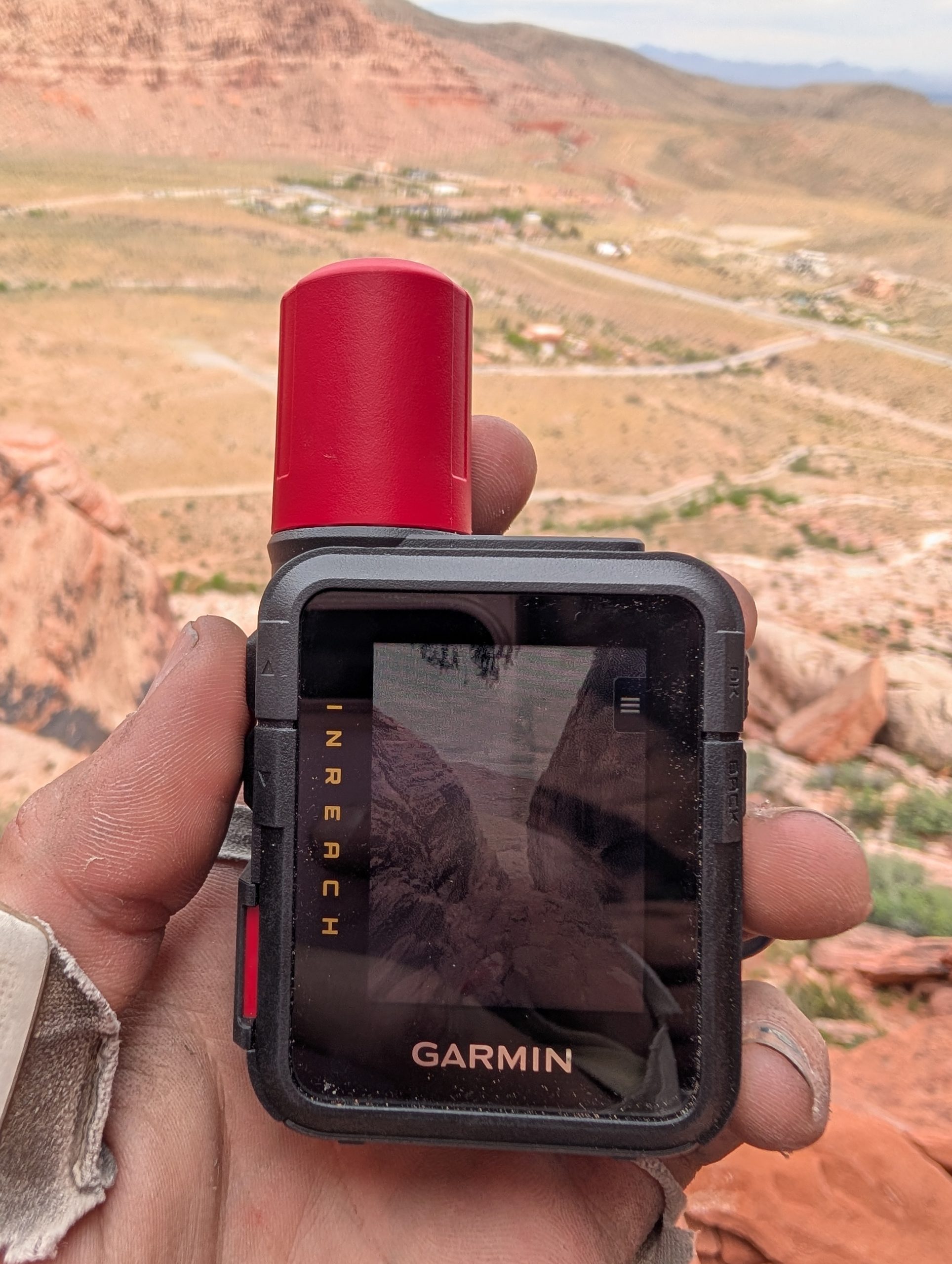
The funky photo preview on device. The limited color palette gives the photo a fun retro look on the device, but sends normally.
Durable Design
Device durability is hard to put numbers to, but it is well understood that the Mini series is hefty and tough. It’s now a hiker cliche to have an inReach swinging off a shoulder strap for hundreds of miles, often without missing a beat. I couldn’t say as much for a smartphone in the same situation.
As a testament to its strength, I broke my original Mini 1 by dropping it off a literal cliff. Despite an eighty-foot freefall onto tallus, the darn thing still was fully functional even with a minor screen crack. I expect no less from the 3 Plus, which has a similar build quality. I won’t be putting this attribute to the test on purpose, however.
Garmin inReach Mini 3 Plus Cons
Heavier than Older Models
As a self-proclaimed ultralight zealot, the increase in weight from previous generations is hard to swallow. The Mini 2 weighs in at 3.4oz, while the 3 Plus hits the scale at 4.4oz. It is also noticeably chunkier.
A reasonable outsider would say that one ounce is nothing, but I’m not reasonable, and it’s not nothing. A 29% weight increase to me is a serious trade-off for the extra features, to the point I am still considering which model to keep using going forward. I would have been just as happy to see the third-gen Mini device trim half an ounce without any new features.
User-Hostile Subscription Changes
Garmin revamped its subscription offerings in 2024. At the time of writing, the lowest-tier subscription is cheaper at face value than the plans of yesteryear ($8/mo now versus $12/mo before), with slight differences between all the years and tiers. Which plan (either from the current group of offerings or from the old options) is ultimately cheaper is highly dependent on the individual’s spread between check-ins, custom messages, tracking, weather updates, and photos/audio.
Garmin now has 3 “tiers” of messages: “check-in,” custom messages (or “quick texts” or weather requests), and messages with audio or photos. The subscription tiers have a specific number of each included. On the cheapest plan, that number happens to be zero, and every message of any type is an itemized upcharge (for 10, 50, and 100 cents in each tier, respectively). The previous cheapest option had an unlimited number of check-ins/presets and 10 texts/weather requests included.
The text of the “check-in” messages is preset by Garmin and can’t be changed. The recipient and whether GPS coordinates are shared can be customized, but only at home from their website. There are only 3 options for the text:
“I’m checking in. Everything is okay.”
“I’m starting my trip.”
“I’m ending my trip.”
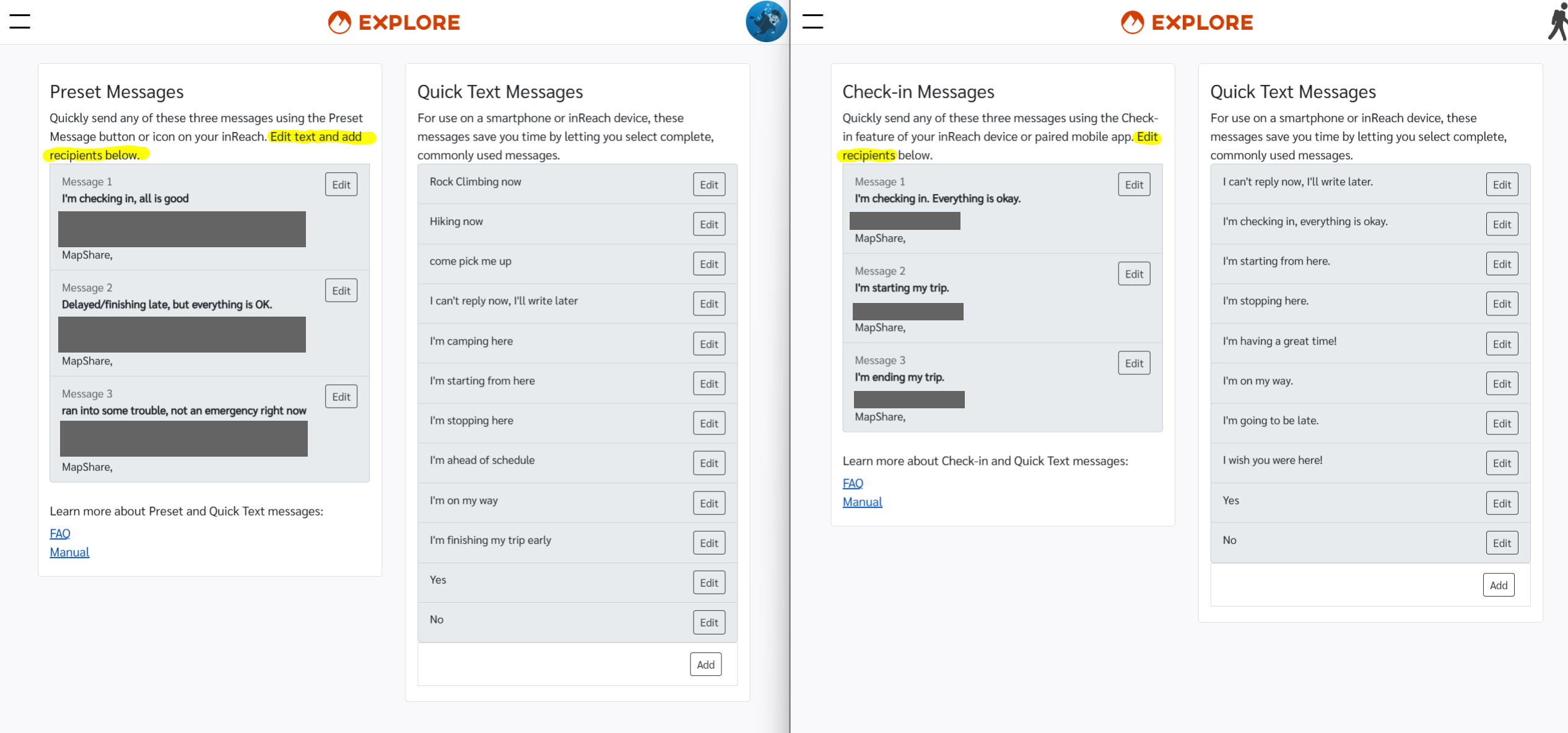
My two Garmin accounts side by side. The left is my “grandfathered” account with customizable presets, the right is with the current and locked down check-in messages. The old version covered 90% of my messaging needs and wins for quick use. The new version, not so much.
What was sneakily lost in the prehistoric times of 2021 was “preset messages.” They are functionally similar to the modern-day “check-in” message: there were only three and they had to be set up from the website. The key difference was the ability to customize the text.
To this day on my Mini 2, I am grandfathered into this much more useful system that I can cheaply tinker to my needs. My first preset is a standard “checking in, all good,” but my second preset is customized to “Delayed/finishing late, but everything is OK.” And my third custom preset message is, “Ran into some trouble, not an emergency right now.”
Between these three, I had very limited need for custom messages. I could easily communicate when I was starting my day (if that were important for some reason), ending it, at the road, or behind schedule.
If a tense situation was developing, my third preset could quickly and easily communicate that without pulling out my cell for a custom message or jumping the gun to an SOS. Despite my best wishes, I actually used this one a lot for bad weather, wildfires, unsafe terrain off-trail, and even a serious but not yet emergency medical situation. And most importantly, all this could be done with unlimited preset messages under the previous cheapest plan option.
Personally, “I’m starting/ending my trip” is useless. If that were really true, I would be in cell service. To use those presets for anything else is just confusing for the folks back home.
The fact that Garmin still charges a $39 “activation fee” in 2026 for a paid plan is also just silly. They’ve softened on this a bit since the initial announcement: if you have a paid plan for at least 1 month a year, you will not get hit with activation fees again when switching back from the “suspended” plan. In my opinion, it shouldn’t even be there in the first place.
Weather Forecast Loses in Accuracy
Over many years of using Garmin devices, I have come to the conclusion that their weather forecasts are both bad and confusing. On many occasions, Garmin has served me a forecast of 40+ mph winds only for me to be met with a light breeze on a ridge. I also struggle to interpret a daily forecast for an 80% chance of rain and thunder when the hourly shows 0% and 0 inches for every hour of the day.
I have famously asked friends and family to be on standby to look up NOAA forecasts while I’m on weather-critical trips. When I compare the two side by side, I consistently find that the Garmin is laughable and the NOAA is close to reality. My distrust of their data runs deep and is reinforced nearly every time I test it.

Well formatted, easy to read, and in this case, almost accurate. It ended up being above freezing that day, which in terms of backcountry skiing, is pretty important to know.
Is the Mini 3 Plus worth it over the regular Mini 3?
Yes, in my humble opinion. At $450 and $500, respectively, the slight difference in price is worth the extra features. If you don’t want to use all of them, don’t!
The ongoing subscription options are identical between the two, but the better antenna and other features may end up being handy and increase resale value. The regular Mini 3 is functionally similar to the much cheaper and lighter Mini 2, which is still available for sale. If you’re trying to save a buck, go retro.
Is the Mini 3 Plus worth it over cell phones with direct-to-satellite technologies?
The answer here is less clear and changing rapidly. At the time of writing, there are a handful of devices and services that work hand in hand to offer a theoretically similar service to an inReach subscription.
This includes SOS-only (many modern smartphones), SOS and plain text (recent iPhones, regardless of service provider, as an example), and limited-bandwidth data connections (recent iPhones with certain T-Mobile plans as an example). In the case of the last option, it actually offers more connectivity than dedicated Garmin devices. It can serve data to select weather and map apps at the moment.
On the horizon is full direct-to-satellite 5G for web browsing, for all phones, all the time (with certain carriers and plans most likely).
So what does the Garmin inReach Mini 3 Plus offer now? The top of my list is reliability, both in terms of connection to satellites (thanks to its magnum antenna and fully developed network of Iridium satellites) and rugged device design.
Having a second device is also inherently redundant. I appreciate this quite a bit when my first device is in and out of my pocket a hundred times a day taking pictures, navigating, and playing audio. A break or a loss almost feels inevitable on a long trail.
For now, I still find value in an inReach, especially as a hiker who spends a lot of time off-trail and in bad weather. Whether I will feel the same in five years remains to be seen.
Value
The inReach Mini 3 Plus has new features combined with long-proven durability. Hikers can find value in a redundant and reliable SOS button for when things go south. The increased cost over previous generations can be hard to swallow, though, especially as smartphones improve their satellite tech. For now, I consider it a worthy companion despite the cost.
Shop the Garmin inReach Mini 3 Plus
A Few Comparison Items
Garmin inReach Messenger | $300 (subscription required)
ZOLEO Satellite Communicator | $150 (subscription required)
ACR bivy stick | $200 (subscription required)
The Garmin inReach Mini 3 Plus was donated for purpose of review

This website contains affiliate links, which means The Trek may receive a percentage of any product or service you purchase using the links in the articles or advertisements. The buyer pays the same price as they would otherwise, and your purchase helps to support The Trek's ongoing goal to serve you quality backpacking advice and information. Thanks for your support!
To learn more, please visit the About This Site page.

Comments 1
One of the best online reviews of the Mini 3 Plus (M3P). I recently purchased one after using a (screenless) Zoleo device for more than 5 years. I especially like that I can connect it (M3P) with my Fenix 8 watch and send/receive messages without using the M3P or my phone.
Regarding cell phones with direct-to-satellite technologies, I own a (Verizon) Pixel 11 Pro XL and, for testing purposes, recently tried texting a friend. Despite a clear view of the sky, after nearly 5 minutes of trying, I was never able to lock onto one of stationary (fixed-position) satellites. That experience, including similar experiences with my Pixel 10, convinced me the M3P is worth its cost and extra weight.